
Our March 2011 usergroup meeting was one of my favorites: there was a wonderful turn out and a lot of lively discussion. The main topic for this meeting was what is everyone doing to leverage BIM / ArchiCAD to get and retain clients? While we did cover a lot of how-to stuff, it was all structured around that basic question.
BIM offers a lot of great opportunities. Better coordinated documents, clash detection, and other ways to minimize problems in the field. Ease of prototyping various design options, incorporating energy modeling and sustainable design options via EcoDesigner and similar programs, and the myriad other ways to improve the design process. In our local group most of us have found the biggest advantage of BIM / ArchiCAD to be improved communication with the client via better visualization options.
One of our members shared his experience using CrazyBump to develop normal maps for use in Artlantis. I don’t know enough to say whether the normal maps built in CrazyBump would work in the Lightworks rendering engine in ArchiCAD, but I don’t see why not. There’s a short video on the CrazyBump website showing how it works. Very cool and very easy. Maxwell Render was again brought up as a counterpoint to Artlantis. I need to get someone to do a presentation on that so we can see how cool it is. I think we’ll also aim to do another presentation on Artlantis this fall, as there is a lot of interest in learning more about that program. And it sounds like our presenter from last time has learned a whole bunch since the original tutorial he gave.
Animation and walk-throughs were also discussed. There was a post on the forum about creating an animation of a section that moves through a building. This can be done by using an object that moves with each frame as an operator on the rest of the building. However my two-year-old daughter Madeleine decided to get up at 6:30 am and not take a nap, so my brain is a bit fuzzy and I can’t find the post. A similar animated view of the building should be possible with this add-on. One local firm uses video conferencing software to do remote walk throughs with the ArchiCAD model. Most of us have done walk-throughs for coworkers or clients in person using this method. It’s good, but not great.
Over the past few months I’ve had a lot of success with Virtual Building Explorer (VBE) and I shared my experiences with the group. For those that aren’t familiar with VBE, it creates a stand-alone model that requires no special software to run and no secret knowledge to explore. The files are typically small enough to e-mail or otherwise transmit over the internet and are self-executing. The clients I’ve sent VBE files to have loved them. And as a testament to how useful VBE models are to understanding a design, for the first time in my career I can finally hold conversations with my family about my work. And perhaps the best part is that I’ve found providing VBE models for clients to be an additional revenue stream. If anyone wants to see an example of the VBE models I’ve created, wants more info about creating one, or is interested in getting Virtual Building Explorer send me an e-mail (sorry that last line sounds a little sales-y; it’s just such a killer app).
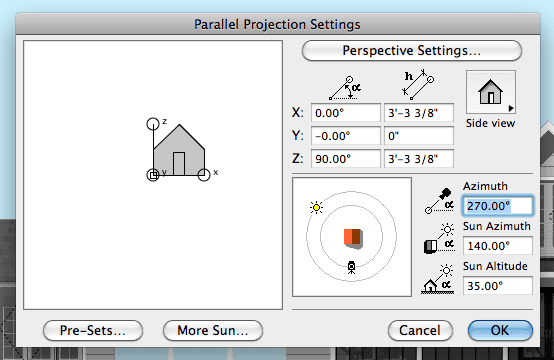
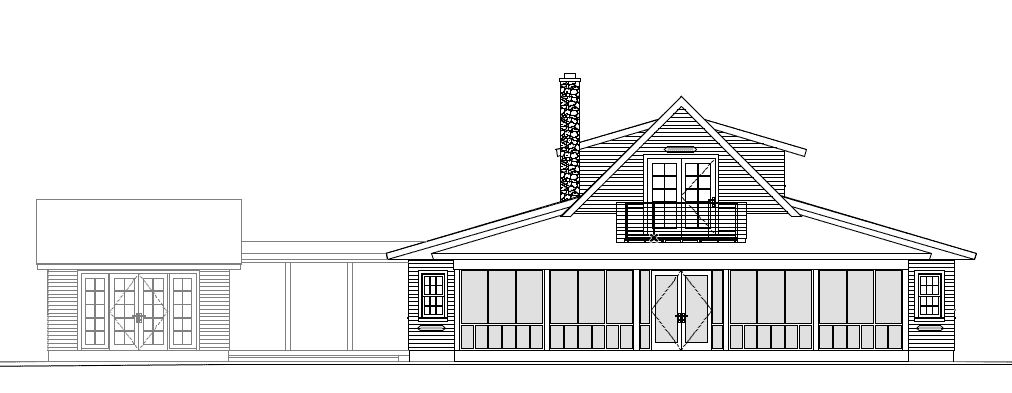
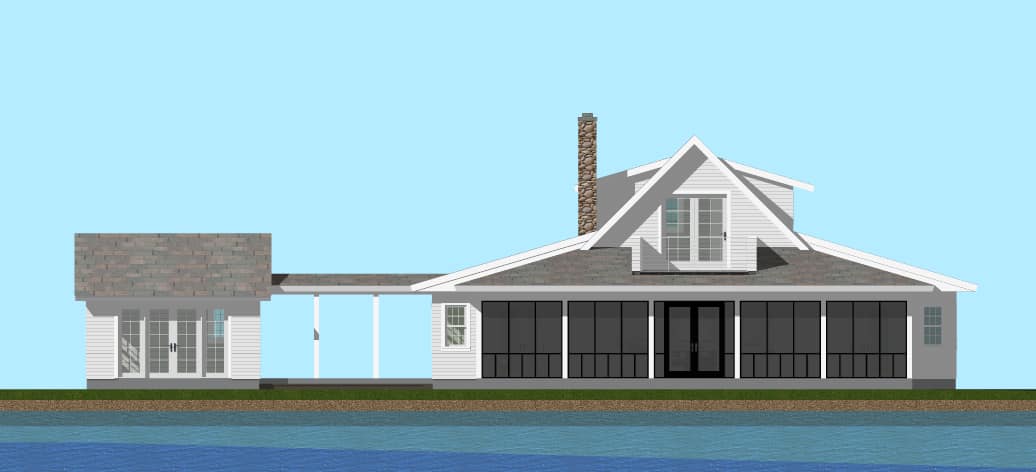
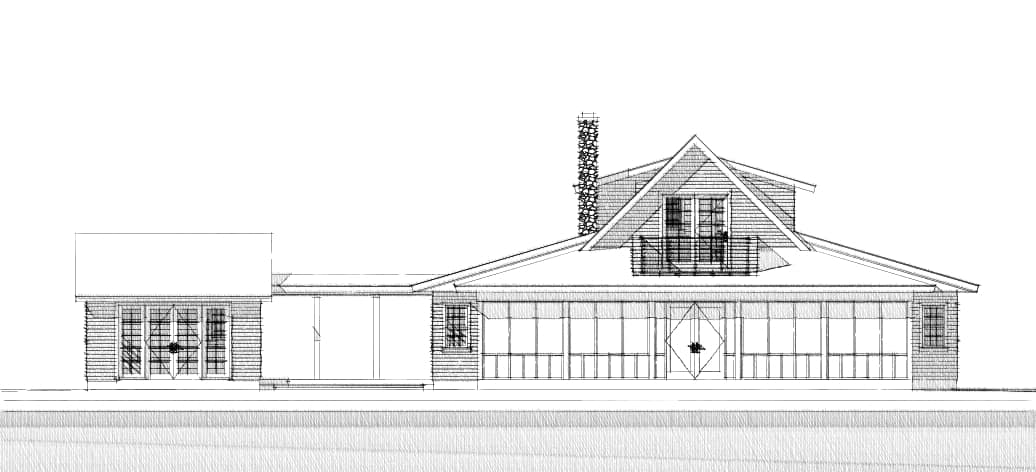
I’ve talked about hidden line renderings before, but I learned something new this week which I thought was really cool. Or perhaps another way to say it is, some dots were connected for me this week. One of the local firms uses the Sketch Rendering engine to produce all of their elevations. It’s a great solution to two of the majors complaints about computer elevations. If your aim is construction documents, your drawings tend to look cold and unsexy. If you create beautiful drawings, you’re spending too much time adding redundant 2D fixes or creating drawings that are tangential to the working drawings/model that you have to do and don’t necessarily further your understanding of the design. The Sketch Rendering engine allows you to dirty up your elevations without wasting time. Go to Parallel Projection Settings, set your camera to look straight at the elevation, set the sun to a pretty angle, and render (this also works great with sections and could also work for plans from the 3D window). I did three quick studies below. One is the elevation as it shows up in the construction documents. This elevation has no 2D additions. The line weights are what the model says, nothing extra. (surprise, surprise when the contractor saw the drawings he wasn’t freaked out that there was no heavy airline). The second image is the same elevation rendered with materials and full color with the internal rendering engine. The last image is the Sketch Rendering engine. The 2nd and 3rd images each tell a different story. The colored image looks done. You see the image and believe that’s the final design. There’s a confidence to it. The sketch image though suggests more the essence of the building than the final solution. One understands the design, but its roughness hints at flux. It leaves room for interpretation. Same model in all three images, just different expressions and different accents. What I find so wonderful about these various options is that I can design and develop the model however is best for my own processes. And I have a variety of outputs available to me during the entire duration of the project (from first sketch to post construction) that can accurately represent the project, highlighting permanence, uncertainty, confidence, transience, etc.
 |
|
|
|
|
There was a lot more covered–our meetings usually end at 8:00 pm, this one continued until closer to 8:30 pm. We talked more about 3D documents, .ifc data exchange with Autodesk products, Telka BIMsight, and EcoDesigner. Some of us also mused about point clouds and 3D printing. I’ve also been working back and forth with SketchUp and shared my experiences with exporting a site model from ArchiCAD 14 to SketchUp 8 Pro (the site was incredibly faster to build in ArchiCAD than in SketchUp). But many of those topics deserve a blog post to themselves, especially the ArchiCAD to Sketchup process which is a nice continuation of this post.
12 thoughts on “MNAUG #12 Recap”
You ~may~ also be interested in Cigraph’s ArchiSketchy for elevations (or any viewpoint) with that sketched look. It’s a paid add-on but gives a little more flexibility. The views weren’t live but that may have changed since I looked at it last.
For the sketch engine, a good tip that your users might be interested in, is the ability to define custom sketch presets by editing the sketchpresets text file. Copy/paste a whole section and tweak it as necessary.
Cheers,
Link.
Link, Thanks I really appreciate your input. I’ll have to check out ArchiSketchy. I’ve not spent much time trying to edit the text files for things like the rendering presets, but I know I need to start doing that. It’s kind of a pain that you can’t just save the rendering presets in ArchiCAD and then load them in a new file.
Jared, do you think you could overlay the sketch rendered and the internal rendered image in the final plot file to create a third type of rendered image? I’ve done this in the past with Photoshop but I think you could do it within ArchiCad.
I think Photoshop is the way to go. I just did a quick test on the project I’m working on. It should theoretically work because the sketch rendering can have a transparent background. But when I stacked the images everything got pixelated and goofy (some of each image was visible). Could just be a video card issue, but I’m using a three week old i7 mac book pro so I’m guessing it’s not that. Photoshop should be fast and straight forward. And this is a good example of right program for right problem. So I’d stick with merging them in Photoshop.
There was a great post a few months ago by someone on the ArchiCAD facebook page who did just that.
Nice recap – thanks, Jared. It was good to have covered a lot of ground in the meeting and I look forward to the next one. A general discussion or two of the pros and cons of LightWorks, Artlantis and Maxwell Render (along with CrazyBump, ArchiSketchy, etc.) would be helpful!
I think a night focused on rendering pros and cons sounds like a great idea.
I love ArchiCAD
First,i have to commend the effort of the publisher of this blog.It is explicitely resourceful for archiCAD users.
Now to my reason for posting this comment. I found your topic on using Sketch rendering engine quite fascinating and intuitive. I am willing and ready to explore any method which would bring out the best of my works.
But i have a problem. First, i do not know how to set the sketch rendering engine parameters to achieve a satisfactory output.Secondly, is it possible to transfer the sketch rendered image to the Layout books?
I would appreciate ur prompt reason. Also, please post your response to e-mail inbox provided above. Thanks.
Nkeze Christopher
Nigeria
Thanks! Renderings done with the Sketch rendering engine can be saved as views in the view map (just like you save a 3D view) or saved as jpgs, tifs, etc. Either of those can be placed on the layout book. As for what parameters to set to achieve a satisfactory output… I don’t have any great advice. I’ve just done trial and error. The best I can say is set all the sliders close to zero. You want an overstretch of 2 not 20. Hope that helps!
Hi Jared. Long time reader, first time post-er. I have used the sketch render over Lightworks rendering directly in Archicad with some success. This really helped define edges and gave a more informal look to the image. I started with a lightworks rendering, saved the image then loaded it in Library Manager, used this image as the background for the sketch rendering. One key thing to remember is to set paper roughness in sketch rendering settings to 0, or it will not be transparent (from Koh-I-Noor starting point IIRC). Overlaying the two images in Photoshop is probably more versatile and easier to manipulate, but just wanted to offer an alternative. Keep up the good work.
Thanks. s2art, I’m a big fan of yours on the forum! Using the Lightworks rendering as the background of the Sketch Rendering is an awesome idea. Thanks. I bet my overlay tests in the layout book didn’t have the paper roughness set to 0. I wonder if it’d work if I did.
Hi Jared,
Fascinating articles – much food for thought! Further to s2art’s comment about making sure the roughness is set to 0, make sure the background colours are set to white (ie 0 on red, cyan, blue etc settings) Archicad won’t recognise the transparency is there’s any colour in the background.