This blog is about using BIM on a day to day basis. I cover ArchiCAD tips and tricks, BIM and management thoughts, and occasionally how this all relates to the Minnesota ArchiCAD Usergroup (which I started in 2009). The specifics are about ArchiCAD—that’s the software I use and sell—but the overall themes are relevant regardless of your software. Programs are just tools. BIM is a mentality.
Posted: January 22nd, 2012 | Author: Vaneshrie Sullivan | Filed under: Guest Bloggers | Tags: Templates, Tutorials | 4 Comments »
The Interactive ArchiCAD Practice Manual came from the realization that, although there are numerous books on teaching ArchiCAD users how to use the tools and navigate around projects, there is not much guidance on how to apply this software in the most efficient manner in an everyday office environment. ArchiCAD is both user friendly and customizable, giving users the freedom to work in the software in countless ways. The price to be paid for this flexibility is that, in an office with many staff and no basic guidelines, the wheel is constantly re-invented. Over 10 years of training ArchiCAD users, I have also noticed that new features are not being applied in a structured format. Many users work with the latest software, but neglect the newer tools and workflows.
The standards in the Interactive ArchiCAD Practice Manual aim to provide solutions to setting up Projects that are easily adaptable through phases of Planning, Tender, Construction, Interiors and As-Built drawings, and have been developed over the years. This book refers to ArchiCAD version 14, however, it is possible to adapt the standards to suit older versions as well. I am hoping that the Interactive ArchiCAD Practice Manual together with standard templates and example files available for download will be a starting point to assist offices in creating the foundations for a structured Practice. It is my hope that every ArchiCAD user will find this book beneficial to their practice.
It is my intention to continue working with newer versions of ArchiCAD and to keep updating these standards. I also offer consultancy services to ArchiCAD users, such as Tailoring Custom Office Templates, Creating Translator Files, Training, Technical Support, Creating Library Parts, etc.
For a preview of the book please visit the website.
Posted: January 8th, 2012 | Author: Jared Banks | Filed under: Long Posts, Product Reviews | Tags: Add-Ons, Objects, Templates, Tutorials | 1 Comment »
So I had an idea a few weeks ago. I’d create a second website. It’d have a comprehensive list of websites that had ArchiCAD content on them –objects, add-ons, templates, tutorials, etc. It’d be great. Maybe eventually I could become a reseller for some of the products, create a one-stop shop for paid and free content, and turn the second website into an ArchiCAD mall. I had a great name for the site: The Cobbler’s Workbench. In my weird world of bizarre names it fits perfectly. Shoegnome is about improving process. The Cobbler’s Workbench would be about getting access to better tools. I love the expansion of my mis-remembered Brother’s Grimm Mythos.
But then I started doing research and compiling lists. There is a LOT of ArchiCAD content out there. Some is new and current, some is stagnant or a few years old. Much of it is in English, but a lot isn’t. All together it is WAY too much for me to organize and manage. And I’m not the first person to try something like this.
So instead I’m going to do something smaller. I’ve created a curated list of 20 or so websites that have objects, tutorials, templates, add-ons, etc. that I think have high value to the community. Most of it is stuff you have to pay for, but within each site is some free content. And there are at least two sites which are completely free.
Some Disclaimer Language
I’m not including blogs or ArchiCAD websites without downloadable content as a main feature. Graphisoft has a list of ArchiCAD blogs here. If I included your site, but you’d rather I describe what you offer in a different manner, or if you think there’s a site I should include, e-mail me. This list is a work in progress and my intent is not to fuss about perfection. It’s a labor of love, like the rest of this site. Perhaps a future version of the page will have pictures, reviews, lots of fancy stuff.
I don’t have any official connection to any of these sites, except as follows: like many ArchiCAD resellers, agents, and content providers, I’m an affiliate of Bobrow Consulting. This means if you click on one of my Bobrow links and then buy one of his products I get credit. It’s a nice little perk for me and doesn’t effect your cost. As of 02/19/12 I’m also an affiliate for Vaneshrie Sullivan’s book as well.
You’ll notice that I now have an Amazon Affiliate widget on the site. I’m trying this out for two reasons. First, I’d like to share books that influence and compliment what I’m writing about. Perhaps it’s a book on leadership that’s informing some blog posts about how to manage elements in an ArchiCAD file or maybe it’s a book on videogame critic that got me thinking about why some people succeed at ArchiCAD and others don’t. Additionally there are a handful (not enough in my opinion) of ArchiCAD books and resources that you can buy on Amazon. And much like the resource page, I want to help share them. So that’s the altruistic reason. Point Two is this: towards the end of 2011 and the beginning of 2012, I’ve been thinking a lot about how to monetize the blog in non-annoying ways. Having Amazon Affiliate links is one experiment. If you click on one of the Amazon links and then buy that book, or anything else on that visit to Amazon, I get a referral commission. That’s great for me and, like my links to Eric Bobrow’s products and Vaneshrie Sullivan’s book, has no material effect on you. Hopefully it’ll generate some income and free up some more time for me to add even more content to the blog.
Posted: December 11th, 2011 | Author: Jared Banks | Filed under: Short Posts | Tags: Frustration, Templates | No Comments »
As a CAD / BIM manager, there is one vein of questioning that I just hate.
It’s not so much the actual question, which is a variation of:
“Why isn’t this working right?”
It’s the answer that angers me:
“Because you’re not following the template.“
These questions drive me crazy. I’m a tactful person, so I’m typically nice about it, probably too nice. But I just want to scream sometimes:
“Look you are wasting my time, your time, and your client’s money. I’m not going to make your solution work. I’m just going to make you follow the damn template.”
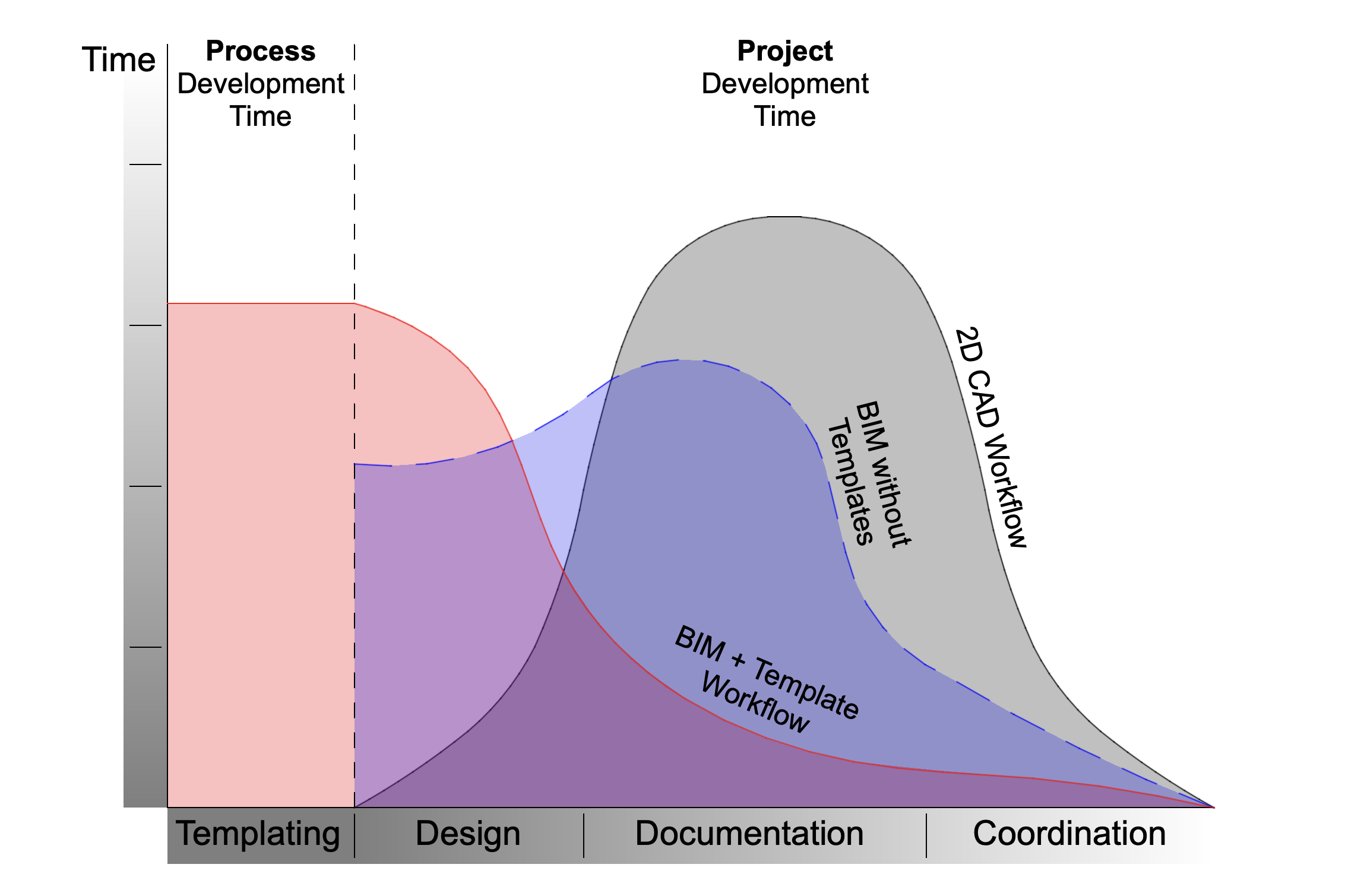
There are tons of reasons for following templates. I recently wrote a blog post about templates and teams. I expanded that post in an article I wrote for the Q4 2011 issue of ArchiMag that was just released in early December. In addition to making team projects manageable, templates WORK. As in if you follow the template, you shouldn’t have errors or ugly drawings. Your window labels will function properly, your drawings will have nice line weights, changes will be easy to manage, printing won’t be a guessing game; the list is nearly endless. ArchiCAD and other BIM applications are complex programs, a template is a way to navigate that complexity. Sometimes a standard is developed to circumvent a glitch in the program. Other times it’s designed to mimic a previous method of production or to solve a problem caused by the template itself. That last point is a sad fact. The standards are developed for whatever reason and to make them work certain other rules that seem arbitrary must be followed. You can use object A, B, or C, but not D. Because if you use D, it’ll cause an error with process E. And we HAVE to use process E because of boss X. Sound familiar? I don’t want to spend my time fixing a problem for someone that I’ve already solved within the office template.
Here are some more of my thoughts on templates and office standards.
Posted: October 4th, 2011 | Author: Jared Banks | Filed under: Long Posts | Tags: Teamwork 2, Templates | 4 Comments »
Parallel Teams
a group of people working on a given project, at the same time.
Teams working in parallel are well discussed in the world of ArchiCAD and BIM. There are a variety of options for ArchiCAD users: independent .pln files, hotlinked modules, and of course Teamwork 2. It’s pretty safe to say that, regardless of what other software venders will tell you, there is no better solution for parallel teams than Teamwork 2. I’ve recently used it on two large residential projects and it is just awesome. But extolling the virtues of Teamwork 2 is not the point here. So let’s talk about…
Serial Teams
a group of people working on a given project, one after the other.
Serial teams are less discussed, but probably happen just as often as parallel teams. And in the world of residential architecture, it’s a constant of working life. So here’s an example that starts at the end: a pretty picture of a recently completed project by SALA Architects.
 |
Projects like this are the bread and butter of the work at SALA Architects. A client buys a home that hasn’t been updated in close to 40 years and they want help turning it into their dream home… but on a tight budget. The lead architect on this particular project was Eric. He met with the client, agreed upon a course of action, and then sent Chris out to measure the existing conditions. Chris measured the home and modeled it in ArchiCAD 11. By the time Schematic Design started in earnest, Chris was off working on another project so Abbie joined the team. Abbie worked on the drawings and got them almost to completion. But then she went on maternity leave for 3 months. So Carol came on board and finished up the drawings. Then Carol went on vacation (I think to California for her oldest son’s college graduation). As with all projects, there were last minute changes and the submission for permitting needed to happen while Carol was gone. So I joined the team. In the end the lead architect (who doesn’t know ArchiCAD) had 4 different people helping him on this remodel, each joining the team after the previous person had left. The project was completed on-time and on budget. It was a huge success.
The Critical Importance of Templates
While it helped to have a great BIM manager who was aware of this project for its entire life, adherence to a solid template is what really made this giant serial team work. As a BIM manager one has to accept that not everyone will perfectly follow your well crafted, pure template. In fact no one will. Probably not even the BIM manager–though the BIM manager will just say s/he’s developing it further rather than not following the template. At least that’s what I tell myself. Anyways, a good template should have flexibility built into it. It should work well for all users with their various skill levels, strengths, and weaknesses. Here’s a diagram I’ve been developing and thinking about recently:
 The red circle represents how a particular user works in ArchiCAD. The user on the left will work well with others in the office. The user on the right won't. |
For every template there’s a zone of acceptable variation around it. If a user deviates from the pure template, but stays within this zone (the white area surrounding the pure zone) then others can easily work both in parallel and in series with this user. If the user’s ‘personal template’ strays into the unacceptable variation zone, then trouble will arise. This is the type of user who insists on doing things their way. It might be using special objects, their own custom libraries, pensets, layers, fonts, backup systems, etc. Some of this is okay. And some deviations are more acceptable than others. But as people stray from the agreed upon template, no matter how awesome or logical their changes and improvements are, the ability for teams to function degrades.
Do all your coworkers follow everything the template defines perfectly or are they individualistic to the point of making the template useless? Is your template flexible enough to allow people to express their own styles without inhibiting the ability to share work?
Or am I a softy and need to crack the whip more, forcing my coworkers into rigid, unerring adherence?
Posted: September 26th, 2011 | Author: Jared Banks | Filed under: Product Reviews | Tags: Endless Path of Improvement, GDL, Objects, Templates | 2 Comments »
An interesting offer…
I’ve been trying to figure out how to write this review for weeks. Okay months. Jeroen de Bruin of Master Script first contacted me about writing a review for Total Zone and Total Marker on July 26th. I was flattered and thrilled. I warned him it’d be a little while. I wanted to use Total Marker and Total Zone in a project. Flipping through features and dreaming is fun, but it’s when objects and tools and tricks are used in projects with deadlines and demanding clients and bosses that the truth comes out. Isn’t that half the point of this blog? Theory AND Practice.
In the Meantime…
Jeroen is infinitely patient with me. He’s a new parent again too, so he understands the girls didn’t sleep this weekend and we’re all sick excuses. We chat a lot via e-mail, discussing life and his work as a GDL scripter. I definitely get the sense that Jeroen and I are kindred spirits in our efforts to help the ArchiCAD community. I ask him to write a blog post about his experiences as a GDL master. He does. I start looking at Total Zone and Total Marker. I’m instantly impressed, which is not typical for me. I notice one or two things I wish Total Marker could do and mention it to Jeroen. His reply? Oh that’s easy. Here’s a new version of Total Marker with that functionality. I go from impressed to amazed. Let me repeat that. Not only did he fix a glitch I found, he ADDED AND IMPROVED to his objects because of a suggestion I made. Now that’s awesome.
Total Marker and Total Zone, let’s finally get to the review
What makes these two objects essential, once you experience using them, is how they both add to and build on the core functionality of ArchiCAD. Each object mines the data already within your project and allows you to leverage that information with new Model View Options.
Why’s that so awesome? Let’s look at a few examples from total marker.
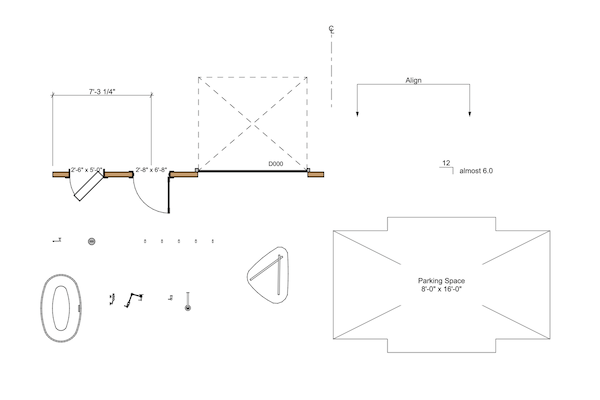
With Model View Options you can set all interior door markers to read differently from exterior door markers. Same goes for windows. In this example I set interior doors to automatically show leaf sizes and exterior doors and windows to show their ID, which is referenced on my exterior door, window, and skylight schedule. Not only is it all automatic, I was able to EXACTLY match the aesthetic of how I used to do it, which was all manually done using object ID. Typing in 2′-8″ x 6′-8″ as the ID of a door to get it to read properly on plan sucked. It wasn’t linked to the actual size, there were often mistakes, I often hit the limit of ID length, and it wasn’t living up to the BIM ideals. Total Marker easily allows me to replicate everything I used to do, but smarter and prettier.
 |
So mimicking aesthetics and dabbling in BIM functionality is great, but let’s go farther. Now that I’m using Total Marker, I can set up doors to show rough opening sizes on a framing plan. This screen capture shows the same entry with different a different set of MVO criteria. Same marker, same door, same project, different MVO, different data displayed. Nothing overridden. A step down the path of BIM.
 |
The variability of MVO has got me thinking about what else I could use the markers for. What other information I can embed in my doors and windows and display on the plan? A good object (or program) should encourage creativity, should get you thinking about other possibilities. What about fire rating? That option has been a parameter for years and years. It’s easy to access, change, and include in a schedule. But what about on a life safety plan? Before this information had to be added as text. But that’s no good. And that’s not coordinated. I want to have the fire rating show up everywhere that it would be useful (schedule/plan) and have it linked. Done. And because it’s done with Model View Options, all these different options can be setup and added to my template. Once that’s done every project is ready to have all this data displayed automatically.
Total Zone works much the same way for zones. Model View Options galore, great aesthetic options, and wonderful at helping you mine all the data already in zones. But this post is already getting long and reaching my preferred max word count. You can learn more by following the links for Total Zone and Total Marker. Perhaps I’ll write more about Total Zone in a separate post. But then again, I’d end that theoretical post the same way I’ll end this one.
I love these two products. They make me wish for more Model View Option Enhanced Objects.
Graphisoft should give Masterscript a nice chunk of money and incorporate them into the standard library for ArchiCAD 16. There I said it. But that probably won’t happen, so go buy them. At 40 € each both objects are a bargain.
Posted: August 5th, 2011 | Author: Jared Banks | Filed under: Short Posts | Tags: Other Blogs and Articles, Templates, Tutorials | 1 Comment »
Okay that title was both lame and a stretch. But whatever. This isn’t about my attempts for humor and continuity with the previous post, it’s about Eric Bobrow and all his ArchiCAD offerings. And he wants to and will make ArchiCAD easier for you.
Eric Bobrow is fast approaching his 500th licensed client using Master Template. Congratulations Eric! That’s huge. To celebrate this milestone he’s offering both discounts AND incentives. I love when people offer both. It’s just cool. Have you ever thought “master template looks great but I can’t invest $275 dollars in improving the way I work.” Well guess what… for a short time it’s $225 and comes with three hours of free webinars. Is it worth investing in yourself now? Jump over to Eric’s website and check it out. And while you’re there spend some time with all his free video tutorials, articles, tips, tricks, etc.
Speaking of improving your processes within ArchiCAD, this would be a great place to link to an article I wrote on research and development in ArchiCAD for ArchiMAG. But it’s not published yet… this fall though. More on that later.
Check out all the details of this limited time offer and get Master Template.
And there’s also a sale on Eric’s ArchiCAD Best Practices Course though August 31st.
Wisdom from the Crowd