This blog is about using BIM on a day to day basis. I cover ArchiCAD tips and tricks, BIM and management thoughts, and occasionally how this all relates to the Minnesota ArchiCAD Usergroup (which I started in 2009). The specifics are about ArchiCAD—that’s the software I use and sell—but the overall themes are relevant regardless of your software. Programs are just tools. BIM is a mentality.

OrthoGraph ArchiCAD Import Module SE has launched

Posted: December 15th, 2011 | Author: | Filed under: Short Posts | Tags: , , | No Comments »

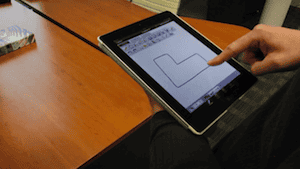
This is great news from last week. Now you can start using OrthoGraph on the iPad with direct, NATIVE export to ArchiCAD for under about 150 euros. Note, you’ll need both OrthoGraph ArchiCAD Import Module SE (99 euros) and Orthograph Architect for iPad (39.99 euros).

OrthoGraph ArchiCAD Import Module SE lets you import 50 rooms per file from the iPad directly to ArchiCAD–which is bigger than any house I’ve ever measured.

If you’re not familiar with OrthoGraph Architect for iPad, you can read more about it and watch some cool videos here.

Now I just need a couple hundred extra dollars to buy an iPad…


OrthoGraph ArchiCAD Import Module has been unleashed

Posted: November 3rd, 2011 | Author: | Filed under: Short Posts | Tags: , , | No Comments »

A bit more exciting news about OrthoGraph, from their blog:

Many of our users have asked and we listened. The beta version of OrthoGraph ArchiCAD Import Module has just been released, a dedicated application for extending ArchiCAD to read OrthoGraph Architect’s native “.srvd” file format.

The current beta version supports the conversions of up to 5 rooms with full functionality from drawings made using the iPad version of OrthoGraph. This limitation can be turned off in the final release by purchasing a licence for the fraction of the price of OrthoGraph Survey, for about €400/$500.

For those users, who don’t need this professional unlimited functionality the 5 rooms limit and the merge function of ArchiCAD is also supported to do their measures step by step for an unlimited time.

For further details please read the OrthoGraph ArchiCAD Import Module’s product page.


OrthoGraph Architect for the iPad has been released!

Posted: November 1st, 2011 | Author: | Filed under: Short Posts | Tags: , , | No Comments »

So yes this official press release is about a month old, but October was a crazy month at Shoegnome World Headquarters in St. Paul, Minnesota. Watch the video; OrthoGraph looks FREAKING AWESOME. I’d love to get my hands on a copy and try it out. But then I also need to get an iPad…

9/27/2011Nuremberg, Germany – InterGEO exhibition – The first professional iPad compatible bulding survey software has been announced! The leading developer of surveying software OrthoGraph introduced and demonstrated their new cutting edge software at InterGEO 2011. The software uniquely supports freehand sketching of floor plans, gesture controls and the exact measurement of all distances on-site. The large screen and powerful hardware of the iPad makes the building survey process extremely fast.

The measurements are reflected graphically in real time, and the intuitive interface of the software helps the surveyor create fully measured floor plans in minutes. OrthoGraph also allows you to view reports with information about the facility on-site by displaying the room and wall surface on the spot. The drawing can be uploaded to Dropbox, this way the measurements can be transferred to your office in the moment they have been created. Now your colleagues can view and collaborate with your surveyors from across the globe.

The new iPad version of OrthoGraph can be purchased from Apple’s AppStore.

Visit www.OrthoGraph.net today for more information!

And here are answers to two frequently asked questions.

Does OrthoGraph for iPad support Leica distance meters?

Actually the iPad-Leica connection is not available because of HW reasons. The PDA version of OrthoGraph Survey has connected with Leica devices for many years now. As soon as it will be supported by the hardware, we will support it in OrthoGraph software too. Anyway, if you have time for that, then I think it is worth a question to Leica, the more we ask for this functionality, the earlier it will be available.

Does OrthoGraph Architect print or save CAD files directly from the iPad device?

OrthoGraph Architect only does the onsite data collection work. The creation of CAD files is supported by the desktop component named OrthoGraph Survey which is an independent product. This is the same with printing functionality too. The concept behind this is to lower the cost for the onsite workers, and for the office it is enough to buy one license of OrthoGraph Survey, which can then handle an unlimited number of mobile devices.

Here’s another video with more explanations of how to draw in the program and then export to ArchiCAD. So damn cool.